Dubai residential portfolio management
Run the portfolio,
not the paperwork
One record runs a Dubai residential portfolio end to end — leases, cheques, bills, maintenance, move-outs and the documents that prove every one of them.
For
Owners
Value, occupancy, cash flow and ROI per property, on one dashboard.
Enter the demo as an ownerFor
Managers
Only the buildings assigned to you, with every lease and request in one queue.
Enter the demo as a managerCheques, Ejari, DEWA and move-outs — in one place you can open
This is the dashboard a Dubai landlord signs into, captured from the running product rather than drawn for this page. Open it yourself in one click, in any of the three roles, on sample data.
- Every post-dated cheque on the contract it belongs to — pending, deposited, cleared or bounced.
- Ejari and the tenancy contract filed against the unit, not in a folder on somebody's desktop.
- DEWA and service charges read in, split, and recharged to the tenant who used them.
- The tenant signs, pays and reports a fault from the phone in their hand.
Three roles, no sign-up · Invitation-only access
The 50-second tour: one record, the whole portfolio.

01
What running a portfolio looks like today
None of what follows is negligence. It is what happens when the record of a tenancy is spread across a spreadsheet, an inbox, a chat thread, a folder, an accountant and somebody's memory.
The bounced cheque nobody saw
A tenant's April cheque is returned. It surfaces in June, when somebody finally reconciles a bank statement against a spreadsheet.
The renewal window that closed
A lease ends in six weeks. The reminder was a calendar entry on one person's phone. The tenant is still in the unit, on last year's rent.
The DEWA bill never recharged
You settle the utility period. It never reaches the tenant's account, and at move-out nobody can say which months were passed on.
The deduction you cannot defend
The tenant disputes a deposit deduction. The only evidence is a photograph in a chat thread, sent to a number that has since changed.
The contract built on stale data
A lease is regenerated for a renewal. The rent is right, the unit number is from the previous tenancy, and the PDF is already signed.
Every one of these is a record that lives in six places at once. When a record has six homes, nobody owns it — and the version that matters is always the one nobody opened.
02
One record, not six copies
The product is not a folder with better search. It is a single record per unit that every role, every screen and every document reads from.
Everything hangs off the unit
The lease, the cheques, the utility bills, the service charge, the inspection and every document are attached to the unit they belong to. There is no second place to look, and no version to reconcile.
The database decides who sees what
Access is enforced in Postgres with row-level security, not in whichever screen happens to be rendering. A manager assigned to two projects loads those two and nothing else, on every screen and in any order — and a manager assigned to none loads nothing at all.
The tenant works from the same record
When a tenant signs on their phone, the signature lands on your contract. When they raise a request, it appears in your maintenance queue. Nothing is re-keyed, re-sent or re-filed.
03
Your week, before and after
Six jobs that fill a portfolio owner's week. On the left, how each one is done when the record is scattered. On the right, the screen that does it here, and the steps it takes.
Onboard a tenant
A template document, a hand-typed cheque list, a printed contract to sign, a scan, an email, a folder. Six documents across three tools.
Tenants → Add tenant. Six steps: tenant info, property, contract, cheques, utilities, review. One generated contract, signed by both sides, attached to the unit.
Collect a quarterly cheque
A reminder on somebody's phone, a call to the bank, a note in a spreadsheet that only one person updates.
The cheque is a row on the contract. Mark it deposited, then cleared. A bounce is a status, and it shows on the tenant and on the dashboard.
Recharge a DEWA period
Find the bill, work out the tenant's share, send it by chat, hope it is paid, then try to remember it at move-out.
Bills → utility bill with payer and account number. Recharge status runs owed → invoiced → settled, or is deducted from the deposit at move-out.
Renew a lease
Open last year's contract, retype the terms, and hope the unit, deposit and co-tenants survived the copy.
Tenants → the contract → Renew. The new term is pre-filled from the one you already hold. Ejari and both signatures reset to pending, so nothing stale is carried forward.
Run a move-out
A walkthrough, photographs on a phone, a deduction argued over chat, and no report either side can point back to.
Move-out → inspection → itemised deductions → a move-out report attached to the contract, visible to the tenant in their own portal.
Answer “how is Tower B doing”
Ask the manager, wait, export two spreadsheets, add them up, and hope the occupancy figure is this month's.
The dashboard. Occupancy and net ROI per building, upcoming payments and cash flow, without exporting anything.
There is no hours-saved figure on this page, because nobody here has measured your week. What changes is countable: how many tools a job touches, and how many places the answer lives.
“How is Tower B doing”
Occupancy and net ROI per building, on the dashboard
Marina Heights
Palm Residences
Downtown Tower
JBR Waterfront
Creek Commercial
04
From purchase to sale, on one record
Six chapters in the life of a unit. Select one to see the screen that carries it.
Acquire
Record the project, building and units, with the payment plan behind them. Booking, DLD, construction, handover and post-handover instalments are each tracked to the date they fall due.
See the full coverage mapPortfolio Value
AED 0.0M
8.4% avg ROI
Yearly Income
AED 0.0M
AED 300K/month
Properties
0 Units
47 occupied, 9 vacant
Net ROI
0.0%
Against the local market
The dashboard
Portfolio value, income booked this year and what falls due next, on the screen the day starts on.
See the workflow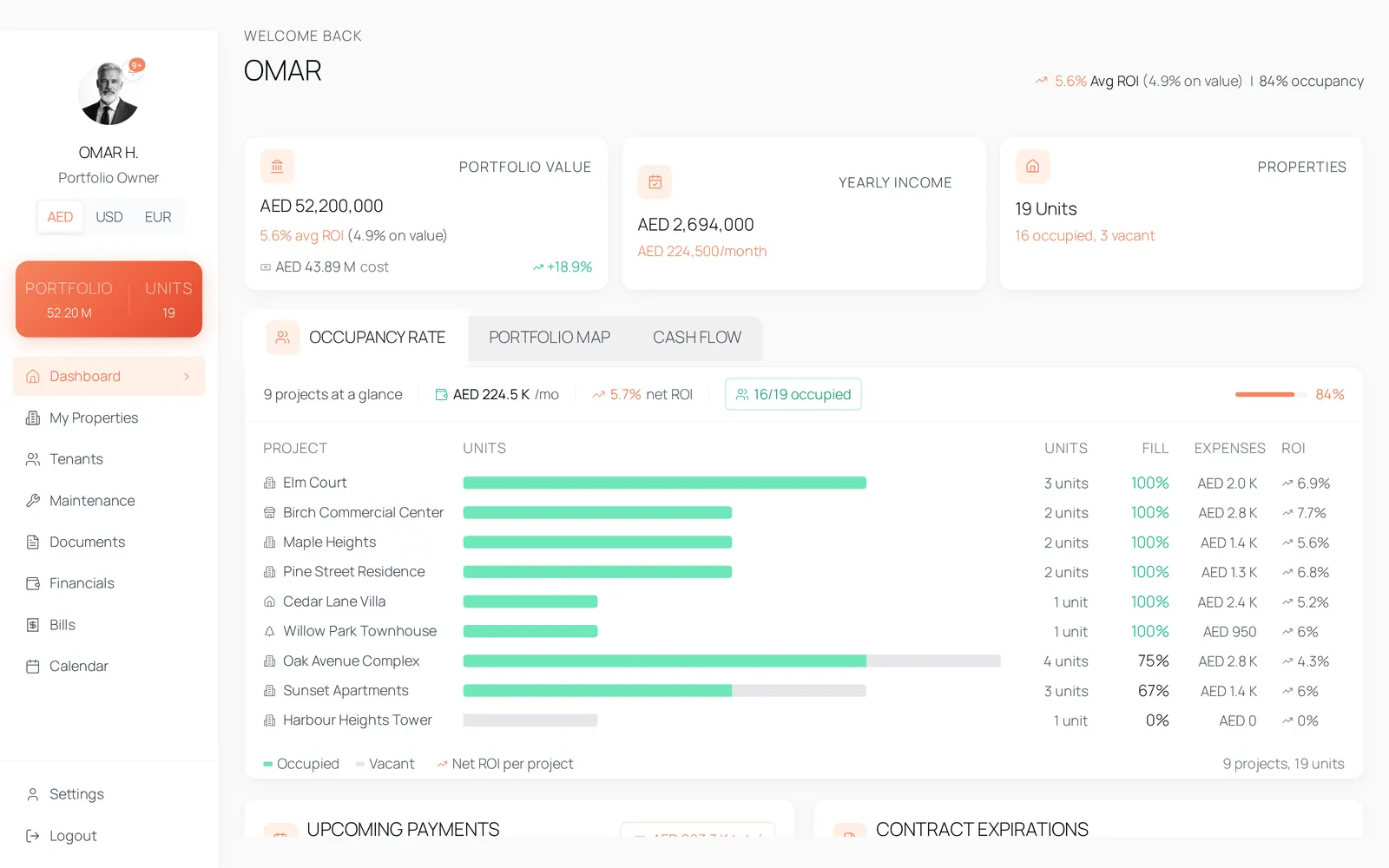
Every workflow, one product
These six are captures from the running product signed in as a demo account, not drawings made for this page — and they are a sample of it.

The tenant sees the same record
Your tenant signs on a phone. They see the lease you issued, the cheques you scheduled, the documents you filed and the maintenance they raised — the same rows you are looking at, not a copy of them. Nothing is re-keyed and nothing is emailed twice.
CTR-2025-0042
AED 160,000
15 Jan 2025
14 Jan 2026
Tenancy contract — awaiting your signature
Signed by the lessor on 12 Jan 2025
06
How complete is it
This is the live product, not a roadmap. Everything below is a screen you can open on the day you are given an account — eight domains, and what each one already covers.
Portfolio
- Portfolio value, yearly income and unit count on one dashboard
- Occupancy and net ROI per building
- Cash flow and cash reserves
- Upcoming payments across every contract
- Year calendar of move-ins, expirations, cheques and instalments
Properties
- Project → building → unit tree, with a portfolio map
- Payment plans by instalment type: booking, DLD, construction, handover, post-handover
- Gallery with room-by-room tagging
- Proximity and amenity blocks per property
- Password-protected share pages with view analytics
Tenants & leases
- Six-step onboarding wizard, ending in a generated contract
- Tenancy contract PDF with lessor and tenant signatures
- Manual upload of externally signed contracts and Ejari certificates
- Renewal pre-filled from the current contract
- Move-out inspection, itemised deductions and a move-out report
Money
- Cheque schedules: pending, deposited, cleared, bounced
- Instalment tracking against each payment plan
- Sale profit and loss including DLD transfer and agent commission
- Income by property and by period
- 40 currencies, nine of them held at fixed peg rates
Bills
- Service charge budgets at a rate per square foot
- Per-period service charge invoices and receipts
- Utility bills: DEWA, Empower, gas, internet, other
- Recharge status: owed, invoiced, settled, deducted from deposit
- CSV export of any filtered view
Documents
- Desktop-style explorer per project, unit and tenant
- Archived projects grouped last, out of the way
- Contract PDFs rendered and cached against the contract
- Ejari certificate stored on the contract it belongs to
- Private storage, opened through links that expire
Operations
- Maintenance requests raised by tenant or staff
- Send a request to an engineer by WhatsApp or email, photos included
- Due and overdue alerts at 30, 15, 10, 5, 3, 2 and 1 days
- Email templates with trigger events, and a send log
- Calendar filtering by event type and building
Access & security
- Four roles: owner, manager, tenant, super-admin
- Row-level security in Postgres on every table
- Managers scoped to the projects assigned to them
- Two-factor authentication on staff accounts
- Super-admin API keys with scopes, limits and documentation
07
Who it is for
Three people open this product, and each of them opens a different thing. What every one of them sees is decided by the database, before a screen is drawn.

Most owners are not at the building. The dashboard is the part of the portfolio they can actually stand in front of.
Owner
Your properties, what they are worth, how full they are, and every payment falling due in the next month.
- Add projects, buildings and units, with their payment plans
- Issue, sign and renew tenancy contracts
- Record cheque movements, service charges and utility bills
- Sell a unit and see the profit and loss behind it
- Assign managers to the projects they should hold
- Reach another owner's portfolio — scope is decided in the database
Manager
Only the projects assigned to you. A manager with no assignment sees nothing at all, by design.
- Onboard tenants and generate their contracts
- Move cheques from pending to deposited to cleared
- Log maintenance and share a request with an engineer
- Upload documents against the units you hold
- Run renewals and move-out inspections
- Open a project you were not assigned to
- Reach Financials or Bills — neither is in the manager's sidebar
Tenant
One lease. Their unit, their dates, their rent, and the cheques still to clear.
- Sign the tenancy contract on their own phone
- Follow the cheque schedule as it clears
- Download the signed contract and the Ejari certificate
- Raise a maintenance request and follow it
- Start a move-out and read the report
- Change the lease, the rent or any cheque
- See any contract, unit or document that is not their own

Built for how Dubai works
Ejari certificates, post-dated cheques, district cooling, service charges by the square foot. These are not edge cases here. They are the job, and they are modelled as such.
Ejari
Registration stays with the authority. The certificate is uploaded and stored on the contract, with the Ejari number beside the lease, so the unit and its paperwork never drift apart.
Post-dated cheques
A year of rent here is four cheques, not a monthly subscription. Each one is a row on the contract, tracked from pending through deposited to cleared — or bounced.
DEWA and district cooling
Utility periods are logged per unit with the payer and the account number, then recharged to the tenant, invoiced, settled, or taken off the deposit at move-out.
Owners, managers, tenants
Portfolios here are held by one party, run by another and lived in by a third. Four roles, scoped in Postgres with row-level security rather than by hiding a menu item.
09
Questions
The six that come up before a demo, answered against the product as it is built today.
No. Registration still happens with the authority, outside this product. What lives here is the certificate and the Ejari number, stored on the contract beside the tenancy agreement — generated or uploaded — so the whole file sits with the unit.
10
See it against your own portfolio
Tell us how many units you hold and what you are running them on today. We will reply with a walkthrough of the screens that would carry them.
Prefer to look first? Explore the live demo — three roles, no sign-up.
How access works
- 01Your request lands in the access-request queue inside the platform.
- 02An administrator reviews it and opens the account.
- 03You sign in, and your portfolio is set up from there.
Already have an account? Sign in